
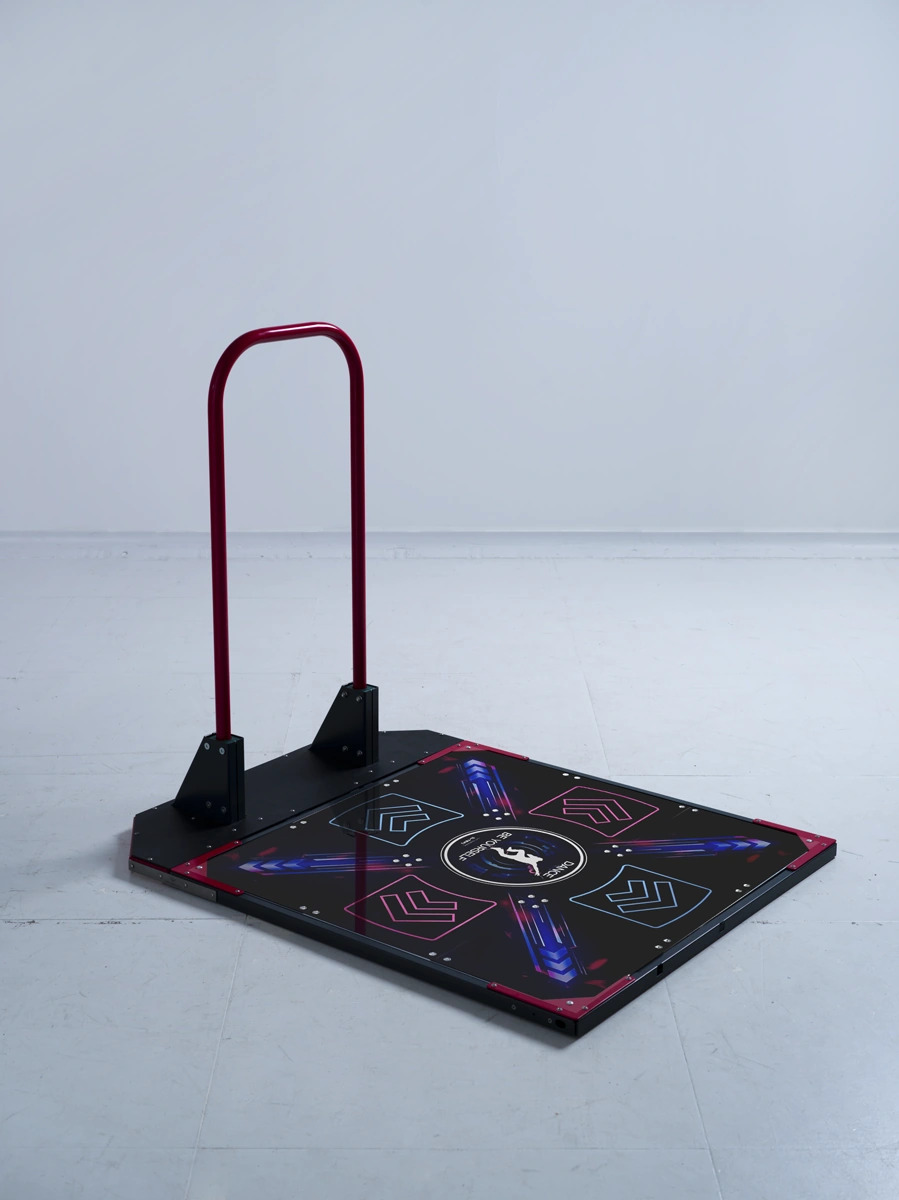
LTEK PRO X & The Handbar Set
Pair the L-TEK PRO X four-arrow USB pad with The Handbar for a dedicated home rhythm-game setup. PRO X brings a glossy surface with UV artwork across all nine panels, while the included home-use rail gives you a handhold for practice. Assemble the kit, connect your computer and begin with the first steps below.
 2 year warranty
 Choose standard shipping (8-12 days) or 24h shipping
- Choose standard shipping (8-12 days)
 Customize


PRO X pad + The Handbar
Your rhythm setup, with room for your own style.
Pair the L-TEK PRO X four-arrow USB pad with The Handbar for a dedicated home rhythm-game setup. PRO X brings a glossy surface with UV artwork across all nine panels, while the included home-use rail gives you a handhold for practice. Assemble the kit, connect your computer and begin with the first steps below.
THE SETUP AT A GLANCE
Each part has a purpose.
LOOK CLOSER
The details that make the difference.
A complete pad-and-rail pairing
One PRO X pad and one The Handbar kit create a setup for rhythm-game practice at home.
Artwork across nine panels
All nine glossy panels feature high-resolution UV printing. The game input layout remains four active directional arrows.
1000 Hz USB polling
The 32-bit ARM controller uses a 1 ms USB polling interval. Set up game and audio timing separately for your computer and display.
Practical pad construction
PRO panels, low sensor travel, aluminium borders, ABS bumpers and anti-slip feet support regular use barefoot or in sports shoes.
A cable you can disconnect
The included USB A–B cable plugs into the recessed socket. Use a suitable hub or adapter for a computer with only USB-C ports.
Optional personal artwork
Add Panel customization to the same order and submit your design in the editor. The custom panels arrive installed on your mat.
01 / The PRO X surface
Nine panels make the picture. Four arrows play the game.
PRO X carries its glossy UV-printed artwork across all nine panels, giving the pad a continuous visual design. Four directional arrows remain the active inputs for up, down, left and right. This is a useful distinction when you choose a pad for StepMania or a DDR-style game: more printed panels do not change the input layout. Under that design are PRO panels, a 32-bit ARM controller and low sensor travel. The pad has aluminium borders, ABS bumpers and anti-slip feet, and it can be used barefoot or with sports shoes. Connect it using the supplied detachable USB A–B cable.

02 / The Handbar included
A home-use rail with its own assembly guide
The support accessory in this set is The Handbar, the powder-coated steel rail designed for home and amateur play. Its base and mounting parts assemble around the PRO X pad. Before unpacking, check the published 888 × 1130 mm base drawing against the space you want to use, allowing extra clearance around it. Follow The Handbar manual together with the updated corner-part supplement, which changes the corresponding steps in the original instructions. Once the pad and rail are assembled, inspect the fixings and floor contact, position the screen and route the cable clear of your feet. Begin with easy movement before playing harder charts.

03 / Make the mat your own
Bring your artwork into the setup
The live PRO X set page offers custom mat panels as an optional addition. Add Panel customization to the same order, choose the appropriate panel option and upload your photo, logo or artwork in the online editor. Check the preview carefully so important details sit correctly across the panel layout. Your customized panels are fitted before the mat is sent. The personalization guide explains the process and provides a place to start preparing a design. The rail keeps its standard construction and finish; the customization service applies to the mat panels. Current options and the extra cost are shown on the live customization page.
04 / Your computer does the playing
Connect the pad after checking the frame
This set supplies the dance pad and support rail for your computer-based setup. You provide a compatible computer, display and rhythm game. Once the hardware is assembled and checked, connect the USB cable, test the four arrows and configure the game controls. The official Software page includes StepMania 5 LTEK Edition as a free Windows beta; check its current requirements before installing. Mac users need compatible software and a suitable adapter or hub where the computer only has USB-C ports. The pad’s 1000 Hz polling specification is separate from game, display and audio delays, so use the timing guide before your first serious practice session.
A GOOD FIRST EXPERIENCE
Assemble it. Connect it. Play your first song.
Begin with the frame and mat, then work through the game setup. You do not need to start with a difficult chart.
- 01
Lay out your home setup
Use the base drawing to plan space for the pad, rail and clear movement around them. Have the computer, display and assembly instructions ready.
- 02
Fit the rail and check stability
Assemble The Handbar using its manual and the current corner-part supplement. Fit the pad, check the fixings and make sure the complete setup sits steadily.
- 03
Connect the pad and install software
Use the included USB A–B cable and any adapter your computer needs. Open the L-TEK Software page for the Windows StepMania 5 LTEK Edition download and requirements.
- 04
Check the arrows and practise
Test all four directional inputs, set the game controls and calibrate timing. Start with an easy song and get familiar with the pad and your hand position.
WATCH WHEN YOU NEED A HAND
First steps on a dance pad
An iAmats introduction to basic steps and dance technique. This is a general beginner lesson, not a demonstration of this particular set or instructions for assembling The Handbar.
The external player loads after you click.
THE PRACTICAL DETAILS
Know what you are choosing.
- Set contents
- One L-TEK PRO X pad and one The Handbar support rail kit
- Pad inputs
- Four active directional arrows
- Printed surface
- All nine glossy panels with high-resolution UV artwork
- Controller
- 32-bit ARM-based USB controller
- USB polling
- 1000 Hz; 1 ms polling interval
- Pad dimensions
- 85 × 85 × 3 cm, as listed for the PRO X pad
- Pad construction
- PRO panels, aluminium borders, ABS bumpers and anti-slip feet
- Cable
- Detachable USB A–B cable included
- Use
- Barefoot or sports shoes
- Included rail
- The Handbar — CNC-machined, powder-coated steel; home and amateur use
- Rail base drawing
- 888 × 1130 mm; allow additional clearance for movement
- Assembly
- Required; The Handbar tools and mounting hardware included
- Computer setup
- PC/Mac with compatible game software; suitable hub/adapter for USB-C-only computers
- PS2 / PSX
- Dedicated L-TEK converter required; purchased separately
- Custom artwork
- Optional Panel customization, ordered separately with the set
BEFORE YOU DECIDE
Good questions.
Useful answers.
Find the answer here, then follow the guide if you want the detail.
Are all nine printed panels active buttons?
The PRO X pad has four active arrows: up, down, left and right. All nine panels carry the printed design, so the visual surface is larger than the active input layout.
Does the set include Handbar PRO?
It includes The Handbar, the support rail for home and amateur use. Handbar PRO is a different accessory and is sold separately. Use The Handbar assembly documents linked here for this set.
What else do I need to start playing?
You need a compatible computer, display and rhythm game. The pad’s USB A–B cable is included; a USB-C-only computer needs a suitable hub or adapter. Assemble and check the rail before connecting the pad.
How much space will the set take up?
The pad is listed at 85 × 85 × 3 cm. The published base drawing for The Handbar shows 88.8 × 113 cm. Leave additional space around the assembly and keep the USB cable clear of your steps.
Can the set be ordered with my own artwork?
Yes. Add Panel customization to the same order, choose the panel option and upload your design in the editor. The custom panels arrive fitted to the mat.
Can I use it with a PlayStation 2 or PSX?
The PRO X pad can be used with supported classic rhythm-game setups through the dedicated L-TEK PS2/PSX converter, sold separately. Check the game and console requirements before ordering.
MATOLOGY & PRACTICAL HELP
A little more detail, when you need it.
L-TEK software downloads
Check the available game downloads and current system requirements.
Custom pad panel guide
Prepare artwork and understand the optional customization service.
YOUR NEXT STEP
Build your PRO X and The Handbar setup
Check your game, available space and artwork choices, then open the live set page for the current options and delivery quote.
Video
Video hosted by an external platform.
| Weight | 29 kg |
|---|---|
| Dimensions | 88 × 94 × 8 cm |
| Type | |
| Application | |
| Shipping | Standard shipping 8-12 days, Shipping in 24h (+44 €) |
1 review for LTEK PRO X & The Handbar Set
Testimonials and tales shared by our dance family


Love it! I used cheap foam pads for a few months, but could feel their limitations (sliding, inconsistent detection, etc). This new metal pad felt like a clear upgrade. The price is a little steep but feels fair given the quality of the board.
Highly recommend!
Marvelous pad. They’re sturdy enough for playing with shoes. I removed the center screws for each arrow and found the sensitivity to be fantastic. Well worth the price.
This pad is amazing!! Don’t listen to anyone saying theyre “not good enough” even without any mods, the pad feels exactly like the arcade! <3 Thank you iAmats for this amazing pad! i'd give it 20 stars if i could.
This pad is amazing!! Don’t listen to anyone saying theyre “not good enough” even without any mods, the pad feels exactly like the arcade! <3 Thank you iAmats for this amazing pad! i'd give it 20 stars if i could.
This pad is amazing!! Don’t listen to anyone saying theyre “not good enough” even without any mods, the pad feels exactly like the arcade! <3 Thank you iAmats for this amazing pad! i'd give it 20 stars if i could.
Read more reviews on our Reddit
community!
Others also bought:
Panel customization
From 6 €L-TEK PS2/PSX Converter
From 38 €Color bumpers for Dance Mat
From 10 €


FAQ
Frequently asked questions
Stepmania LTEK is a popular choice for dance mat users due to its simple operation and easy song customization. L-TEK also offers the Connect Buddy, a tool that links Stepmania with the PADY Fitness iOS app, allowing you to monitor your training progress. Both tools are available in our Software section.
Stepmania LTEK can also integrate with the Amusement Lights Controller, adding dynamic lighting effects for enhanced gameplay.
For additional options, LTEK Interactive Mats are compatible with various games to combine fitness and entertainment. Find a list of recommended games in our Games to Play on Mat section.
L-TEK Dance Mats are compatible with PlayStation 2 and PSX consoles using a dedicated converter available in our store. Converters specifically designed for PlayStation 2 and PSX can be found in the PS2 & PSX converter section.


Elodie Changey (verified owner) –
Now that I’ve used this pad for a few weeks, I can stay that it’s amazing and quite sturdy. It doesn’t slide on the ground, as I play barefoot I can feel the buttons so I know if I’m off, and it’s sensitive enough. My level isn’t high enough to need the bar yet, but I trust it to handle my light weight in the future.